The Agentic Shift: A Comprehensive Analysis of AI Coding Productivity and Tool Efficacy in 2026

1. Introduction: The Productivity Paradox of the Agentic Era
By early 2026, the software engineering landscape has undergone a transformation as profound as the advent of open-source libraries or cloud computing. The integration of Artificial Intelligence (AI) into the development lifecycle has graduated from a novelty—characterized by simple autocomplete suggestions—to a fundamental operational paradigm. We have entered the “Agentic Era,” where tools like Cursor, Windsurf, GitHub Copilot Workspace, and Claude Code no longer serve merely as assistants that suggest the next line of code, but as autonomous agents capable of reasoning, planning, and executing complex multi-file refactoring tasks with minimal human intervention.1
However, this technological leap has precipitated a stark division in the industry—a “Productivity Paradox” that defines the current discourse. On one side lies the vendor-driven narrative of exponential efficiency, fueled by surveys and telemetry indicating that developers “feel” significantly more productive and can complete tasks up to 55% faster.3 On the other side, a growing body of rigorous, independent research paints a more complex and concerning picture. Landmark studies conducted in 2025, such as the randomized controlled trial (RCT) by METR, have demonstrated that for experienced developers working on complex “brownfield” architectures, the use of AI tools can actually result in a 19% slowdown in task completion time.5 Furthermore, longitudinal analysis of code quality by firms like GitClear reveals a rising tide of “AI-induced technical debt,” characterized by exploding rates of code churn and duplication.7
This report aims to pierce the veil of marketing hype that surrounds the AI coding assistant market in 2026. It provides an exhaustive, evidence-based analysis of the leading tools, evaluating their architectural differences, their real-world impact on engineering velocity and quality, and the hidden economic costs of their adoption. By synthesizing data from over 200 distinct research snippets, benchmarks, and field studies, this document serves as a strategic manual for engineering leaders tasked with navigating the transition from human-centric to AI-augmented development.
1.1 The Evolution of the Toolchain: From Completion to Composition
To understand the current market dynamics, one must appreciate the trajectory of the technology. The first generation of AI coding tools (circa 2021-2023), epitomized by the early versions of GitHub Copilot, relied on simple Large Language Model (LLM) prediction—essentially a probabilistic autocomplete that guessed the next token based on the preceding context window. While useful for boilerplate reduction, these tools lacked “agency”; they could not navigate the file system, run terminal commands, or understand the broader architectural intent of a change.
The second generation (2024-2025) introduced “Chat” interfaces and Retrieval-Augmented Generation (RAG), allowing developers to query their codebase. However, the context was often limited to open files or keyword matches, leading to frequent hallucinations where the AI would invent functions that did not exist in the project.9
In 2026, we have firmly arrived at the third generation: Agentic IDEs and Autonomous CLIs. These systems are distinguished by two key capabilities:
Deep Contextual Indexing: Tools like Windsurf and Cursor now build comprehensive local vector indices of the entire codebase, often parsing the Abstract Syntax Tree (AST) to understand the semantic relationships between symbols across thousands of files.9
The Cognitive Loop: Agents like JetBrains Junie and Claude Code operate on an OODA loop (Observe, Orient, Decide, Act). They can run a test, observe the failure, plan a fix, edit the code, and re-run the test autonomously, iterating until the problem is solved.12
The implication of this shift is that the bottleneck in software production is moving from “typing speed” to “review speed.” The developer’s role is evolving from an author to an editor and orchestrator of AI agents—a transition that brings its own set of cognitive challenges and productivity risks.14
2. The Productivity Reality Check: Metrics vs. Sentiment
The central tension in the 2026 market is the gap between how productive developers feel (sentiment) and what the data shows regarding actual output and code quality (reality). While vendor marketing and developer surveys consistently report massive gains, objective measurements of task completion and code stability suggest a more nuanced, and often negative, impact.
2.1 The Optimistic Narrative: Velocity and Vibe Coding
The narrative of “speed” is backed by substantial, primarily vendor-sourced, data. GitHub’s internal research has long cited the figure that developers using Copilot are 55% faster at writing code.3 In 2025, surveys of professional developers indicated that 81% of Copilot users reported productivity gains, with nearly 90% stating that they felt more fulfilled in their jobs because the AI handled repetitive toil.15
This sentiment is strongly correlated with the rise of “Vibe Coding”—a development style prioritized by startups and solo founders where the goal is to prototype and ship functional applications as rapidly as possible, often with little regard for long-term maintainability. In these “greenfield” scenarios, where there is no legacy code to break and no complex architecture to respect, AI tools act as powerful force multipliers. They allow developers to generate entire scaffolding, unit tests, and documentation in seconds, effectively reducing the “time-to-first-draft” by an order of magnitude.17
The psychological impact of this speed cannot be understated. The removal of the “blank page problem” and the rapid generation of boilerplate creates a sense of continuous progress, or “flow,” which developers interpret as productivity. However, as the METR study reveals, this feeling of flow can mask underlying inefficiencies.
2.2 The Skeptical Reality: The METR Study and the “Expertise Gap”
In July 2025, the research organization METR published a Randomized Controlled Trial (RCT) that fundamentally challenged the “speedup” consensus. The study recruited 16 experienced open-source developers and assigned them 246 real-world maintenance tasks (bug fixes, refactors, feature additions) on mature repositories they were already familiar with.5
The results were shocking to the industry:
The Slowdown Effect: Developers were 19% slower when allowed to use state-of-the-art AI tools (specifically Cursor Pro with Claude 3.5/3.7 Sonnet) compared to when they worked without AI assistance.5
The Forecast Failure: Prior to the study, both the developers and external experts predicted that AI usage would result in a 24% to 39% speedup. Even after completing the tasks—where the logs showed they were slower—the participants still estimated they had been 20% faster.6
This disconnect between perception and reality highlights the “Expertise Gap.” For experienced engineers working in complex, “brownfield” codebases, the cognitive load of using AI is high. The time spent prompting the model, waiting for generation, reviewing the voluminous output, and debugging subtle context errors often exceeds the time it would take to simply write the correct code manually.18 The AI lacks the tacit knowledge of the project’s unwritten conventions, leading it to suggest “plausible but incorrect” solutions that trap the developer in a cycle of debugging—a phenomenon known as the “debugging loop”.15
The METR study suggests that while AI reduces the sensation of effort (toil), it increases the complexity of the task by introducing a new layer of abstraction (the AI agent) that must be managed.
2.3 The Quality Crisis: Churn and Fragile Code
If the METR study challenged the velocity argument, the 2025 AI Code Quality Report by GitClear challenged the quality argument. Analyzing over 200 million lines of code changed between 2020 and 2025, GitClear identified a disturbing trend: the rise of “fragile code.”
The study found that “Code Churn”—defined as code that is written and then deleted or rewritten within two weeks—is projected to double in 2026 compared to pre-AI baselines.7 This indicates that a significant portion of AI-generated code is defective or ill-suited for the codebase, requiring immediate rework. Furthermore, the study noted a dramatic spike in code duplication. AI models, which lack a holistic view of the repository’s utility libraries, often re-generate logic that already exists elsewhere, leading to bloated, repetitive codebases that violate the DRY (Don’t Repeat Yourself) principle.19
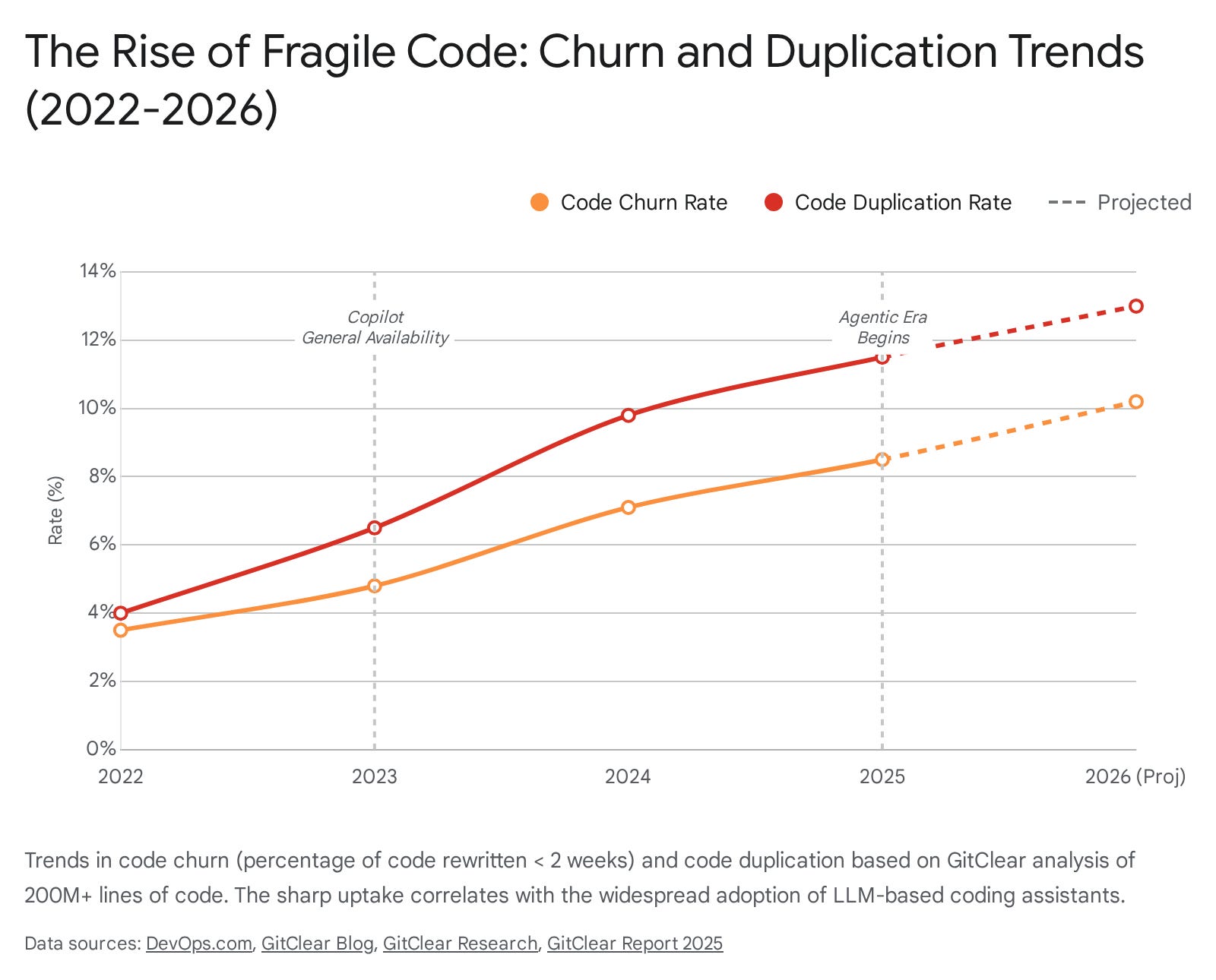
This “AI-induced technical debt” poses a severe long-term risk. While features may be shipped faster in the short term, the accumulation of duplicated and churning code increases the maintenance burden, potentially slowing down engineering velocity in the long run.
3. Comparative Analysis of Market Leaders
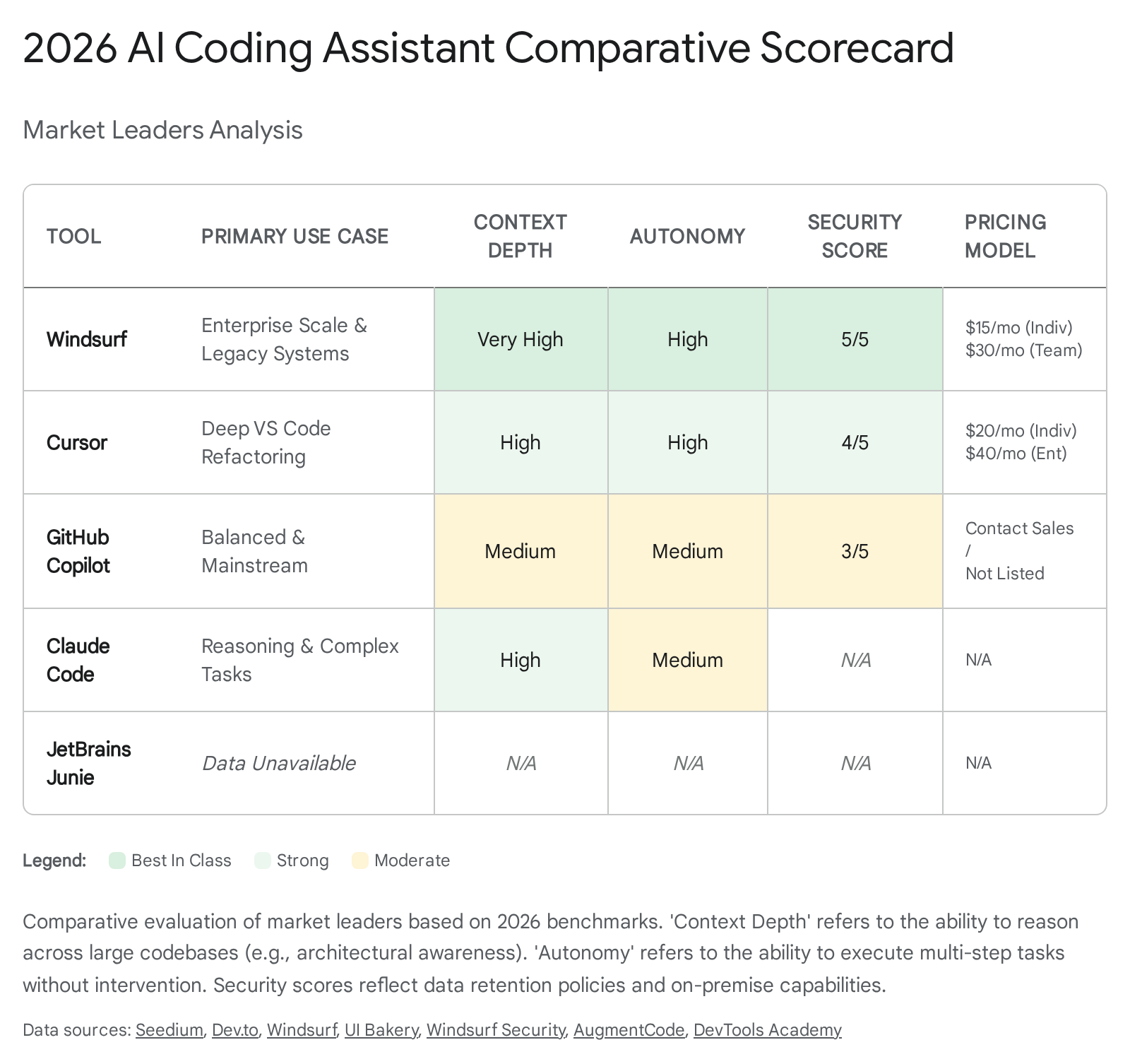
The AI coding tool market in 2026 has fractured into distinct segments, each catering to different developer needs and organizational constraints. The market is no longer a monopoly held by GitHub Copilot; it is a fierce competition between “Plugin Ecosystems” and “AI-Native IDEs.”
3.1 GitHub Copilot: The Enterprise Incumbent
Positioning: GitHub Copilot remains the mass-market standard, leveraging its massive distribution advantage through the Microsoft ecosystem. It is the “safe” choice for large enterprises that prioritize compliance, legal indemnification, and seamless integration with existing workflows.21
Key Features & Evolution:
In response to the rise of agentic competitors, GitHub expanded the platform in 2026 with Copilot Workspace. This feature moves beyond simple code completion to offer a “task-centric” environment. Workspace allows developers to start from a GitHub Issue, generate a plan in natural language, and have the AI implement the changes across multiple files, all within a sandboxed environment that can be reviewed before merging.21
Additionally, Copilot now supports multi-model choice, allowing users to toggle between OpenAI’s GPT-4o, Anthropic’s Claude 3.5 Sonnet, and Google’s Gemini. This flexibility addresses a major criticism of earlier versions—model lock-in—and allows teams to select the model best suited for their specific task (e.g., Claude for reasoning, Gemini for context window).21
Strengths:
Ecosystem Integration: Its deep integration with GitHub Issues, Pull Requests, and Actions makes it a comprehensive lifecycle tool rather than just a code editor.23
Compliance: Copilot sets the standard for enterprise data protection, offering IP indemnification and SOC 2 compliance, which is critical for Fortune 500 adoption.25
Weaknesses:
Plugin Limitations: As an extension running inside VS Code or JetBrains, Copilot is constrained by the IDE’s API. It lacks the “deep awareness” and UI control that native forks like Cursor possess, making its multi-file refactoring capabilities less fluid.9
Latency: Users have reported that the plugin can be resource-intensive, leading to IDE freezes and slower response times compared to the optimized engines of competitors.26
3.2 Cursor: The AI-Native Disruptor
Positioning: Cursor has established itself as the “power user’s” choice. By forking VS Code, the Cursor team has rebuilt the editor interface to treat AI as a first-class citizen, enabling interactions that are impossible for standard plugins to replicate.21
Key Features & Evolution:
Cursor’s dominance in the “pro” segment is driven by two features: Tab and Composer.
Cursor Tab: A “super-autocomplete” that predicts not just the next token, but the next sequence of edits. It can suggest changes across multiple lines simultaneously, effectively allowing the developer to “tab through” a refactor.21
Composer: An agentic interface that allows users to edit multiple files at once using natural language. A user can prompt, “Move the Auth logic to a new service and update all references,” and Composer will plan and execute the changes across the entire codebase, presenting a diff view for review.17
Strengths:
User Experience (UX): Cursor is widely praised for its “flow,” reducing the friction between thought and code. The integration is seamless, making the AI feel like an extension of the developer’s mind rather than a sidebar chatbot.29
Privacy Mode: Cursor offers a strict “Privacy Mode” where code is never stored on their servers, addressing the concerns of individual developers and privacy-conscious startups.31
Weaknesses:
Maintenance Burden: As a fork, users must maintain a separate IDE installation. While it supports VS Code extensions, it can occasionally lag behind upstream updates, leading to compatibility issues.9
Pricing Complexity: The usage-based pricing for premium models (like Claude Opus) can be unpredictable, leading to potential “bill shock” for heavy users compared to flat-rate enterprise seats.33
3.3 Windsurf (formerly Codeium): The Secure Enterprise Native
Positioning: Windsurf positions itself as the “Enterprise Native” alternative—offering the deep AI capabilities of a custom IDE (like Cursor) but with the strict security and governance controls required by large organizations.9
Key Features & Evolution:
Windsurf differentiates itself with its proprietary Cascade context engine (also referred to as “Flows”). Unlike standard RAG, which retrieves text snippets, Cascade indexes the deep semantic structure of the codebase (AST, call graphs), allowing for “architectural awareness.” It creates Codemaps—visual representations of the code’s dependencies—to help both the AI and the user navigate complex monorepos.9
Strengths:
Security & On-Prem: Windsurf offers self-hosted deployment options and default Zero Data Retention (ZDR), making it the only viable “AI-Native” option for highly regulated industries (finance, defense) that cannot use cloud-based SaaS tools.34
Cost Efficiency: Windsurf generally undercuts Cursor on pricing ($15/month for individuals vs. $20/month) and offers a more competitive team tier, making it attractive for cost-conscious organizations.9
Weaknesses:
Learning Curve: The “Flows” paradigm and the deeply integrated agentic features can be steeper to learn than Cursor’s intuitive chat interface, potentially slowing down initial adoption.35
UI Polish: Some users report that the interface feels slightly less refined and “clunky” compared to the polished experience of Cursor.30
3.4 The Rise of Autonomous Agents: Claude Code & JetBrains Junie
In 2026, a new category of tool has emerged: the Autonomous Agent. These are not text editors but “digital employees” that run in the background or terminal.
Claude Code (CLI): Developed by Anthropic, this is a command-line agent designed for deep, “headless” work. It excels at massive refactoring jobs (e.g., “Upgrade this entire application to React 19”). It lives in the terminal, interacts with git, runs tests, and iterates on errors. It is favored by “ops-heavy” engineers and Vim/Neovim users who prefer raw intelligence over a GUI.38
JetBrains Junie: Integrated into the JetBrains ecosystem (IntelliJ, PyCharm), Junie acts as a “junior developer.” It can be assigned a task (e.g., “Fix the compilation errors in module X”) and will autonomously plan, edit, compile, and verify the fix. Its integration with the IDE’s compiler gives it a massive advantage in correctness—it “knows” if the code compiles before showing it to the user.12
4. Technical Deep Dive: The Architecture of Autonomy
The capabilities of 2026 tools are defined less by the underlying Large Language Model (LLM)—since most rely on similar foundation models like Claude 3.5 Sonnet or GPT-4o—and more by their system architecture and context engineering.
4.1 Context Engineering: The Battle for “Grounding”
The primary technical challenge for AI coding tools is Context Window Management. A typical enterprise repository contains millions of lines of code, far exceeding the context limit of even the largest LLMs. The effectiveness of a tool is determined by its Retrieval-Augmented Generation (RAG) strategy.
Standard RAG (Copilot): Traditionally, tools like Copilot relied on simple keyword matching to retrieve relevant snippets. This is fast but “shallow.” It often misses semantic connections (e.g., finding where a variable is mutated in a different file).10
Deep Indexing (Windsurf/Cursor): Advanced tools now build a local graph of the codebase. Windsurf’s “Context Engine” parses the project’s AST to understand logical relationships. When a user asks a question, the system queries this graph, allowing it to retrieve exactly the relevant functions and definitions, even if they don’t share keywords. This “Deep Indexing” significantly reduces hallucinations and enables the AI to reason about system-wide refactors.9
4.2 The Cognitive Loop: From Open-Loop to Closed-Loop
The shift from “Assistant” to “Agent” is architecturally defined by the transition from an Open Loop to a Closed Loop system.
Open Loop (Assistant): The user prompts, the AI generates, and the process ends. The user is responsible for verification.
Closed Loop (Agent): Agents like Junie and Claude Code implement a recursive control loop. They generate code, run the project’s linter or test suite, observe the output, and if an error is detected, they autonomously generate a fix and retry. This “self-healing” capability allows agents to operate asynchronously, solving problems while the developer focuses elsewhere.12
4.3 BYOM (Bring Your Own Model)
A growing trend in 2026 is BYOM, where the tool acts as a “shell” and the user provides their own API key for the intelligence layer. Tools like Roo Code and Windsurf support this, allowing organizations to switch between OpenAI, Anthropic, or Google models instantly as new benchmarks are released. This commoditizes the model layer and shifts the competitive advantage to the IDE’s context management and UX.1
5. The Economic Calculus: TCO and ROI
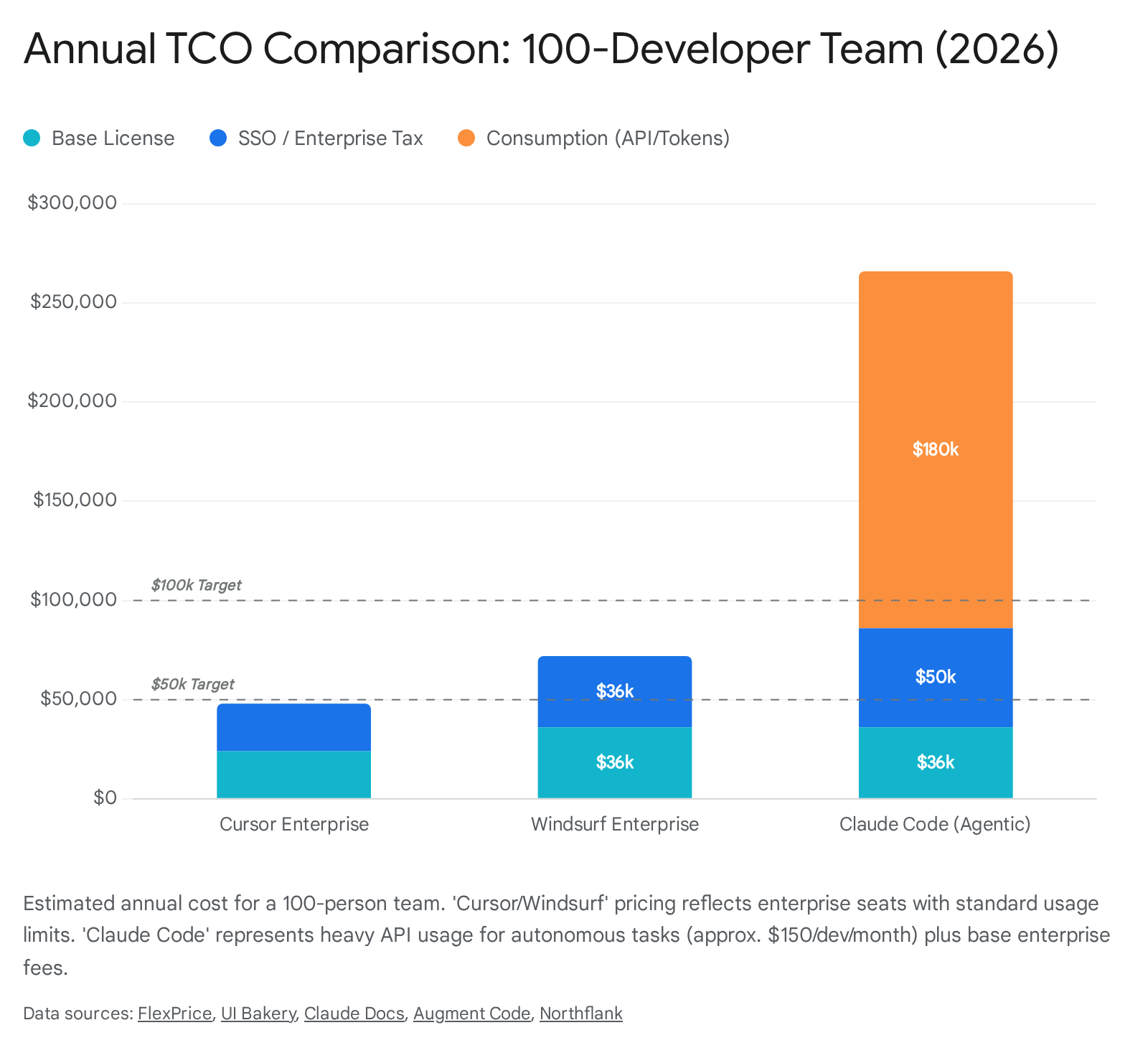
For engineering leadership, the adoption of agentic tools is a financial decision that extends beyond the sticker price of the license. The Total Cost of Ownership (TCO) in 2026 is a function of license fees, API consumption costs, and the “hidden” costs of productivity flux.
5.1 Pricing Models: Seats vs. Consumption
The market is divided between two pricing philosophies:
Seat-Based (Flat Rate): GitHub Copilot (~$19/user/mo) and Windsurf Teams (~$30/user/mo) offer predictable, flat-rate pricing. This is favored by enterprise procurement departments as it eliminates budget volatility.37
Consumption-Based: Tools like Claude Code and the high-tier plans of Cursor often involve “credits” or pass-through API costs. Agentic workflows are extremely token-hungry; a single complex refactor task might involve dozens of internal “thoughts” and file reads, costing $2.00–$5.00 in API credits per task. For a team of 100 developers, uncontrolled agentic usage can lead to massive “bill shock,” where monthly API costs dwarf the base license fees.38
5.2 ROI and the “Slowdown” Factor
Calculating Return on Investment (ROI) is no longer a simple matter of “hours saved.” If an engineer costs $150/hour, saving one hour per month pays for the tool. However, the METR study indicates a potential loss of productivity on complex tasks. If a tool causes an engineer to spend 2 extra hours debugging an AI hallucination, the ROI is negative, regardless of the license cost. Therefore, the economic value of these tools is highly sensitive to how they are used. In greenfield projects, the ROI is massive; in complex maintenance, it may be negative.5
6. Strategic Recommendations for Engineering Leaders
Navigating the 2026 landscape requires a nuanced strategy that goes beyond simply “buying the best tool.” Organizations must align their tool selection with their specific operational constraints and architectural reality.
6.1 A Framework for Tool Selection
For Enterprise Stability (The “Safe” Path):
Large organizations with strict compliance requirements and massive, heterogeneous engineering teams should prioritize GitHub Copilot. Its integration with the broader GitHub ecosystem (Workspace, Advanced Security) provides a “floor” for productivity without introducing significant risk. The “Enterprise” tier’s indemnity and policy controls are unmatched.21
For Velocity and Innovation (The “Power” Path):
Startups, scale-ups, and teams focused on rapid product iteration should adopt Cursor or Windsurf. The velocity gains offered by features like “Composer” and “Cascade” are too significant to ignore. For these teams, the ability to iterate on features 50% faster outweighs the friction of maintaining a custom IDE. Cursor is the choice for teams that want the best UX; Windsurf is the choice for teams that need that power but require on-prem/self-hosted security.21
For Complex Legacy Maintenance (The “Agentic” Path):
Teams managing massive, undocumented “brownfield” systems should deploy Windsurf or JetBrains Junie. The deep contextual indexing of Windsurf and the compiler-aware loops of Junie provide the only reliable way to apply AI to legacy code without causing catastrophic regressions.9
6.2 Managing the “Human” Transition
The most critical challenge is not technical, but cultural. The “slowdown” effect identified by METR often stems from misuse—using AI for tasks where human intuition is faster.
Training: Engineers must be trained on “AI Literacy”—knowing when to use an agent and when to write code manually.
Junior Developers: Organizations must proactively address the “learning loop” crisis. If junior developers rely entirely on agents to write code, they may fail to develop the deep understanding required to review that code effectively. Mentorship programs must shift focus from “teaching syntax” to “teaching review and architecture”.14
In conclusion, the AI coding landscape of 2026 offers unprecedented power, but it is not a panacea. The organizations that succeed will be those that treat these tools not as magic wands, but as sophisticated instruments that require skilled operators, rigorous governance, and a clear understanding of the trade-offs between speed, cost, and quality.
Works cited
Best AI Coding Agents for 2026: Real-World Developer Reviews ..., accessed January 5, 2026, https://www.faros.ai/blog/best-ai-coding-agents-2026
20 Best AI Coding Assistant Tools [Updated Aug 2025] - Qodo, accessed January 5, 2026, https://www.qodo.ai/blog/best-ai-coding-assistant-tools/
Best AI Coding Assistants: The Complete 2025 Guide with Step-by-Step Usage, accessed January 5, 2026, https://brightseotools.com/post/Best-AI-Coding-Assistants
Measuring Impact of GitHub Copilot, accessed January 5, 2026, https://resources.github.com/learn/pathways/copilot/essentials/measuring-the-impact-of-github-copilot/
Measuring the Impact of Early-2025 AI on Experienced Open-Source Developer Productivity, accessed January 5, 2026, https://metr.org/blog/2025-07-10-early-2025-ai-experienced-os-dev-study/
[2507.09089] Measuring the Impact of Early-2025 AI on Experienced Open-Source Developer Productivity - arXiv, accessed January 5, 2026, https://arxiv.org/abs/2507.09089
Best of 2025: AI in Software Development: Productivity at the Cost of Code Quality?, accessed January 5, 2026, https://devops.com/ai-in-software-development-productivity-at-the-cost-of-code-quality-2/
Q3/Q4 2025 Updates: Making AI Visible with Cohorts, Context, and a Clearer Path to Engineering Truth - GitClear, accessed January 5, 2026, https://www.gitclear.com/blog/q3_q4_2025_updates_ai_visible_cohorts_context_engineering_truth
Windsurf vs Cursor | AI IDE Comparison, accessed January 5, 2026, https://windsurf.com/compare/windsurf-vs-cursor
JetBrains AI vs GitHub Copilot: Which One Should You Use? - Zencoder, accessed January 5, 2026, https://zencoder.ai/blog/jetbrains-ai-vs-github-copilot
GitHub Copilot Workspace vs Cursor: Which Will Dominate Developer Workflows in 2026?, accessed January 5, 2026, https://gswebtech.com/blog/github-copilot-workspace-vs-cursor-which-will-dominate-developer-workflows-in-2026
JetBrains debuts agentic AI coding with ‘Junie’, but reviews for existing AI Assistant are poor, accessed January 5, 2026, https://devclass.com/2025/01/25/jetbrains-introduces-agentic-ai-coding-with-junie/
Junie, the AI coding agent by JetBrains, accessed January 5, 2026, https://www.jetbrains.com/junie/
Measuring the Impact of AI Assistants on Software Development - AWS, accessed January 5, 2026, https://aws.amazon.com/blogs/enterprise-strategy/measuring-the-impact-of-ai-assistants-on-software-development/
Developer Productivity Statistics with AI Coding Tools (2025 Report) - Index.dev, accessed January 5, 2026, https://www.index.dev/blog/developer-productivity-statistics-with-ai-tools
Research: Quantifying GitHub Copilot’s impact in the enterprise with Accenture, accessed January 5, 2026, https://github.blog/news-insights/research/research-quantifying-github-copilots-impact-in-the-enterprise-with-accenture/
Cursor 2.0 vs Windsurf 2025: AI IDE Showdown - Skywork.ai, accessed January 5, 2026, https://skywork.ai/blog/vibecoding/cursor-2-0-vs-windsurf/
Measuring the Impact of Early-2025 AI on Experienced Open-Source Developer Productivity, accessed January 5, 2026, https://www.lesswrong.com/posts/9eizzh3gtcRvWipq8/measuring-the-impact-of-early-2025-ai-on-experienced-open
AI Copilot Code Quality: Evaluating 2024’s Increased Defect Rate with Data - AWS, accessed January 5, 2026, https://gitclear-public.s3.us-west-2.amazonaws.com/GitClear-AI-Copilot-Code-Quality-2025.pdf
AI Copilot Code Quality: 2025 Data Suggests 4x Growth in Code Clones - GitClear, accessed January 5, 2026, https://www.gitclear.com/ai_assistant_code_quality_2025_research
AI Coding Assistants Comparison: Best AI Tools for Coding in 2026, accessed January 5, 2026, https://seedium.io/blog/comparison-of-best-ai-coding-assistants/
AI Coding Agents 2025: GitHub Copilot vs Rovo Dev vs Cursor vs Claude vs Gemini vs Codeium, accessed January 5, 2026, https://dev.to/haraf/ai-coding-agents-2025-github-copilot-vs-rovo-dev-vs-cursor-vs-claude-vs-gemini-vs-codeium-5ham
GitHub Copilot Workspace: Welcome to the Copilot-native developer environment, accessed January 5, 2026, https://github.blog/news-insights/product-news/github-copilot-workspace/
GitHub Copilot vs. JetBrains Junie Comparison - SourceForge, accessed January 5, 2026, https://sourceforge.net/software/compare/GitHub-Copilot-vs-JetBrains-Junie/
Cursor AI vs. GitHub Copilot: Which One Wins? | by Cos - Medium, accessed January 5, 2026, https://cosminnovac.medium.com/cursor-ai-vs-github-copilot-which-one-wins-45ba5828741f
GitHub Copilot - Your AI Pair Programmer Plugin for JetBrains IDEs, accessed January 5, 2026, https://plugins.jetbrains.com/plugin/17718-github-copilot--your-ai-pair-programmer/reviews
Github Copilot Agent vs Cursor AI Which is BEST for Coding - YouTube, accessed January 5, 2026,
Cursor vs GitHub Copilot: Which One Is Better for Engineers? - Zencoder, accessed January 5, 2026, https://zencoder.ai/blog/cursor-vs-copilot
My experience with Github Copilot vs Cursor : r/ChatGPTCoding - Reddit, accessed January 5, 2026, https://www.reddit.com/r/ChatGPTCoding/comments/1cft751/my_experience_with_github_copilot_vs_cursor/
Cursor vs. Windsurf: Real-World Experience with Large Codebases - Reddit, accessed January 5, 2026, https://www.reddit.com/r/ChatGPTCoding/comments/1htlx48/cursor_vs_windsurf_realworld_experience_with/
Data Use & Privacy Overview - Cursor, accessed January 5, 2026, https://cursor.com/data-use
Privacy and Data Governance | Cursor Docs, accessed January 5, 2026, https://cursor.com/docs/enterprise/privacy-and-data-governance
Windsurf vs Cursor Pricing in 2025: Comprehensive Comparison for Tech Teams, accessed January 5, 2026, https://uibakery.io/blog/windsurf-vs-cursor-pricing
GitHub Copilot vs Cursor vs Windsurf AI Comparison - Digital Marketing Agency, accessed January 5, 2026, https://www.digitalapplied.com/blog/github-copilot-vs-cursor-vs-windsurf-ai-coding-assistants
Windsurf vs Cursor: Which AI Code Editor Wins in 2025? - Truescho, accessed January 5, 2026, https://truescho.com/read-blog/4862_windsurf-vs-cursor-which-ai-code-editor-wins-in-2025.html?lang=turkish
Security | Windsurf, accessed January 5, 2026, https://windsurf.com/security
Cursor vs Windsurf (Codeium): Feature & Price Guide - Augment Code, accessed January 5, 2026, https://www.augmentcode.com/tools/cursor-vs-windsurf-codeium-feature-and-price-guide
Manage costs effectively - Claude Code Docs, accessed January 5, 2026, https://code.claude.com/docs/en/costs
Claude Code CLI vs VS Code extension: am I missing something here? : r/ClaudeAI - Reddit, accessed January 5, 2026, https://www.reddit.com/r/ClaudeAI/comments/1pooqgp/claude_code_cli_vs_vs_code_extension_am_i_missing/
AI Coding Agents: Autonomous Development in 2026 - Swfte AI, accessed January 5, 2026, https://www.swfte.com/de/blog/ai-coding-agents-autonomous-dev
Windsurf Pricing Explained: Plans, Use Cases & Comparisons | UI Bakery Blog, accessed January 5, 2026, https://uibakery.io/blog/windsurf-pricing
Claude Code: Rate limits, pricing, and alternatives | Blog - Northflank, accessed January 5, 2026, https://northflank.com/blog/claude-rate-limits-claude-code-pricing-cost